VCF Binaries/ESXi-Components&Metadata download strategies
A picture is worth a thousand words, some might say:
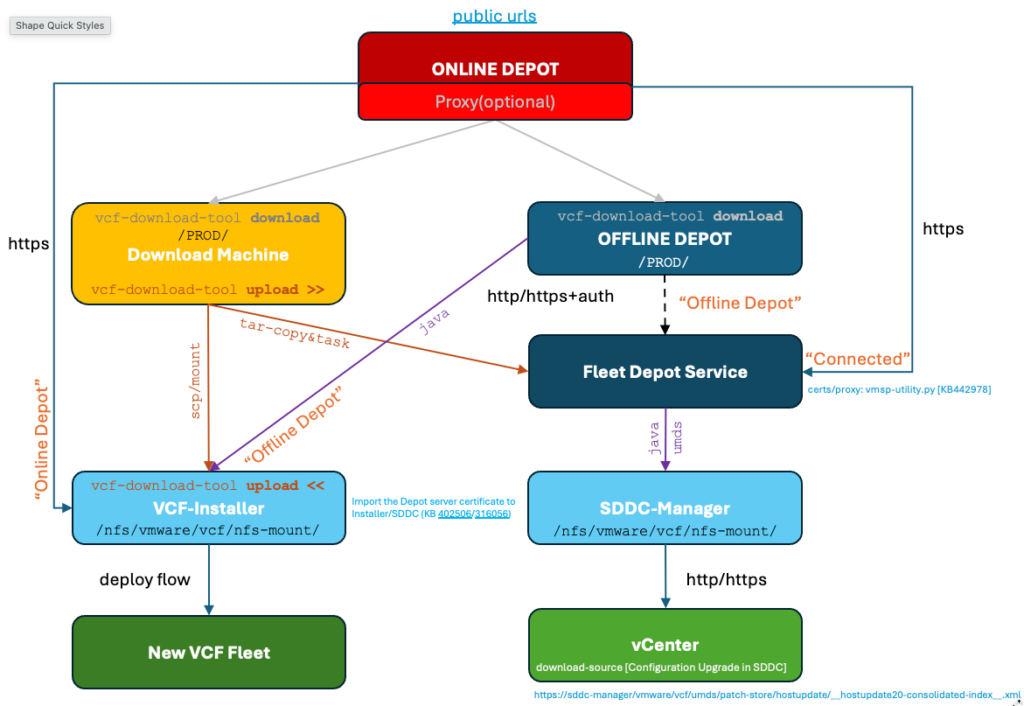
But, let me elaborate a little more on the possible strategies to download VCF (9.1.1) binaries, ESXi-components and metadata for VCF-Installer and VCF-OPS. There are several moving parts to be aware of and I will try to explain why and when to use the specific methods. The eventual goal is to successfully download binaries in the VCF-Installer and additionally ESXi-components/metatadata in the SDDC-Manager UI. Failing to provide the necessary files will result in download/sync errors and issues creating new vLCM-images in vCenter.
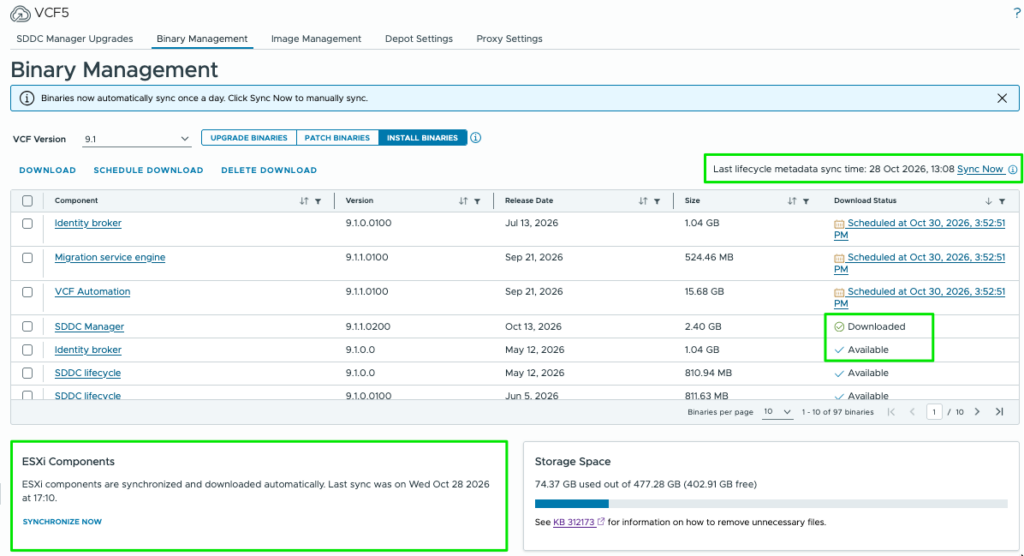
Before we dive into the scenario’s I’ll summarize the findings:
- Binary and Metadata files can be located:
- Online(https)
- Offline-Depot(http/https+auth)
- Depot-Service-Filestore
- SDDC-Manager local store
- SDDC-Manager always stores binaries/bundles/metadata locally (in /nfs/vmware/vcf/nfs-mount). The folder-structure is different from what we find in online/offline depots.
- SDDC-Manager’s umds patch-store is a download-source in vCenter (for images/vendor-addons/vibs).
- vcf-download-tool download works the same for Download-Machine or Offline-Depot-VM.
- vcf-download-tool upload works differently for VCF-INSTALLER and Depot-Service.
- Disconnected upload Flow for OPS: run upload-cmd on Download-Machine > local-tar-file > uploads tar to Depot-Service > task on Depot-Service > SDDCm download binary/metadata/ESX-components.
- Disconnected upload Flow for VCF-INSTALLER: mount(ro) or scp PROD-folder onto VCF-INSTALLER > run upload-cmd on VCF-INSTALLER > Components are immediately available (no download necessary).
- Outbound connections to the Online Depot require access to these public-urls
- Direct upload status/activity on Deport-Service can be monitored by accessing the VMSP Depot-Service Deployment
Scenario 1: Direct Online Connection
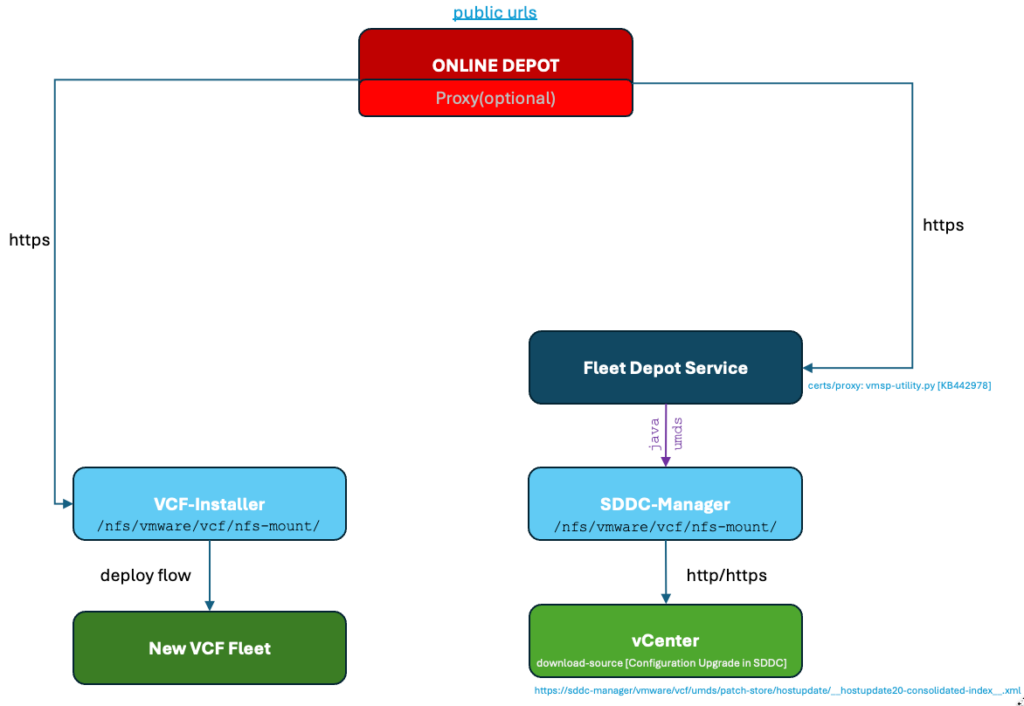
This is the most straightforward method to Install VCF or Manage existing VCF environments. In VCF-Installer Binaries become available for download. In SDDC-Manager, Lifecycle and ESXi-components are sync’ed and Binaries become available for download. SDDC-Manager relies on the VMSP Depot-Service for which you might need to use the vmsp-utility script to configure an outbound proxy. Resulting picture:
Scenario 2: Offline Depot
For many organizations it will be prohibited to use a direct connection to the Online-depot (even if a proxy is available). We then need to set up an internal depot-VM where we make use of the vcf-download-tool to download the specific binaries and metadata. The depot-VM is nothing more than a linux-VM with a webserver enabled (http/https/auth) that will present the exact same folder structures as we would see on the online-depot.
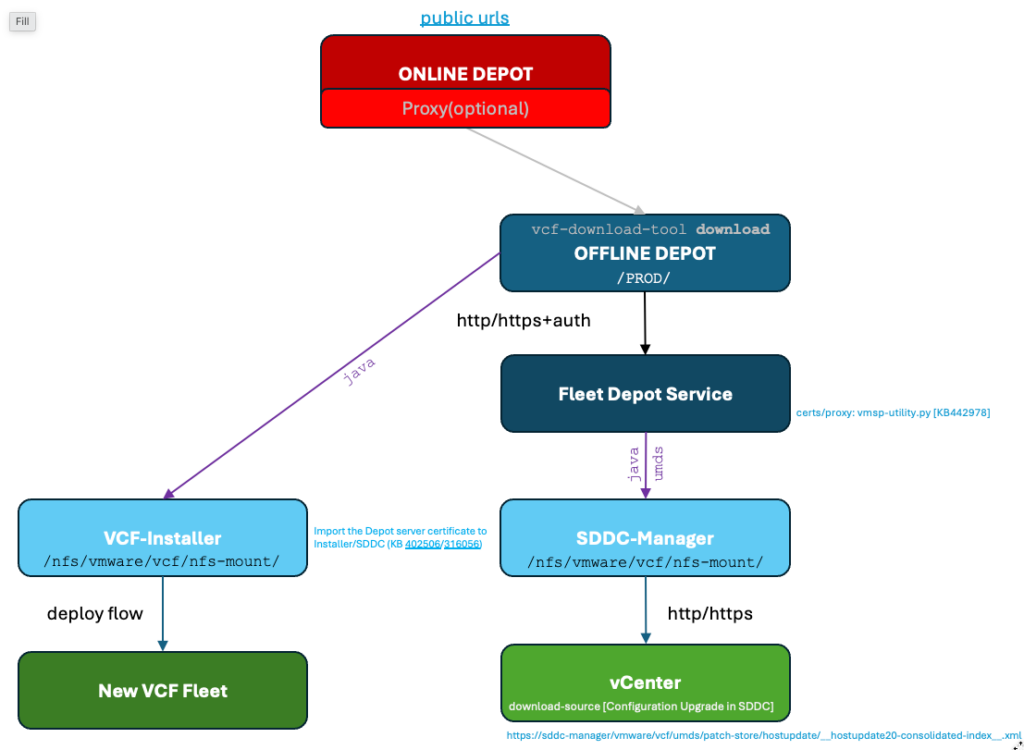
Technical details and examples for this scenario:
- For VCF-Installer we will only need to download the INSTALL-files
- For SDDC-Manager we will need to download INSTALL/UPGRADE and ESXi-Components
- Binaries are downloaded locally to VCF-INSTALLER/SDDC-Manager by a java-process. On SDDC-Manager, ESXi-components are synced with the well known umds-tool
./vcf-download-tool binaries download --depot-download-activation-code-file ac.txt --sku VCF --vcf-version 9.1.1 --depot-store /data/www/html/vcf911 --type INSTALL
./vcf-download-tool binaries download --depot-download-activation-code-file ac.txt --sku VCF --vcf-version 9.1.1 --depot-store /data/www/html/vcf911 --type UPGRADE
./vcf-download-tool esx download --depot-download-activation-code-file ac.txt  --depot-store /data/www/html/vcf911

root@sddc-manager [ ~ ]# /opt/vmware/vmware-umds/bin/vmware-umds -G
Configured URLs
URL Type Removable URL
No Default URLs Configured
HOST     YES      https://vcfleet.vcf.lan/depot-service/content-gateway/PROD/COMP/ESX_HOST/main/vmw-depot-index.xml
HOST     YES      https://vcfleet.vcf.lan/depot-service/content-gateway/PROD/COMP/ESX_HOST/addon-main/vmw-depot-index.xml
HOST     YES      https://vcfleet.vcf.lan/depot-service/content-gateway/PROD/COMP/ESX_HOST/iovp-main/vmw-depot-index.xml
HOST     YES      https://vcfleet.vcf.lan/depot-service/content-gateway/PROD/COMP/ESX_HOST/vmtools-main/vmw-depot-index.xml
HOST     YES      https://vcfleet.vcf.lan/depot-service/content-gateway/PROD/COMP/ESX_HOST/patch-store/hostupdate/__hostupdate20-consolidated-index__.xml

Patch store location  : /nfs/vmware/vcf/nfs-mount/umds/patch-store
Export store location :
Proxy Server          : Not configured
Scenario 3: Disconnected for VCF-Installer
In this scenario we are aiming to inject the necessary binaries into VCF-Installer for it to run the Deployment Wizard. This is called the disconnected mode (in de UI we do NOT configure an Online or Offline Depot!) in which we use a Download Machine (PC/VM) to download the INSTALL binaries after which we transfer (upload) these to the VCF-Installer. This results in a download-status “Success” and we therefore do not need to explicitly Download binaries in the UI.
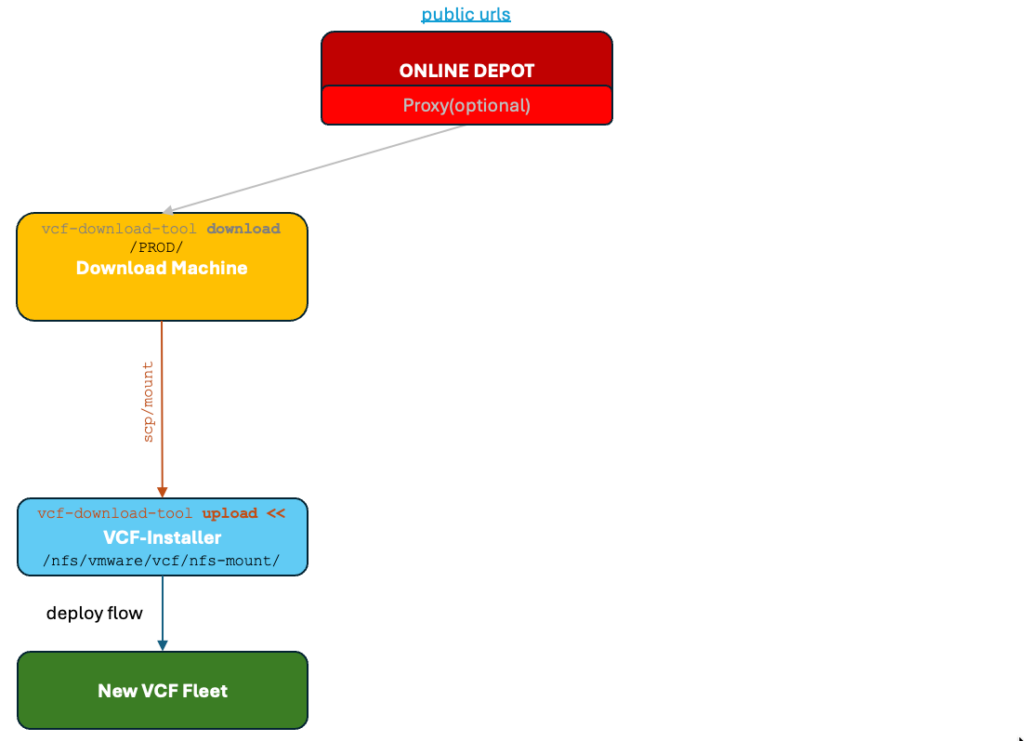
Some important details are:
- The vcf-download-upload tool must be executed on the VCF-Installer itself while the downloaded files are accessible locally (either by copying [scp] them or direct nfs-mount to the download machine)
- Keep in mind the vcf-download-tool will remove the source-files (–depot-store path) after successful upload! To prevent this from happening, change to file permissions and/or nfs-mount to readonly!
On Download Machine:
./vcf-download-tool binaries download --depot-download-activation-code-file ac.txt --sku VCF --vcf-version 9.1.1 --depot-store /data/www/html/vcf911 --type INSTALL

>> Mount/copy filestructure to /mnt on VCF-Installer!

On VCF-Installer:
./vcf-download-tool binaries upload --depot-store /mnt --sddc-manager-fqdn sddc-manager.vcf.lan --sddc-manager-user admin@local
Scenario 4: Disconnected for VCF-OPS/Fleet
The disconnected scenario for VCF-OPS is different than the previous one because we now need to inject the files into the VMSP Fleet Depot-Service.
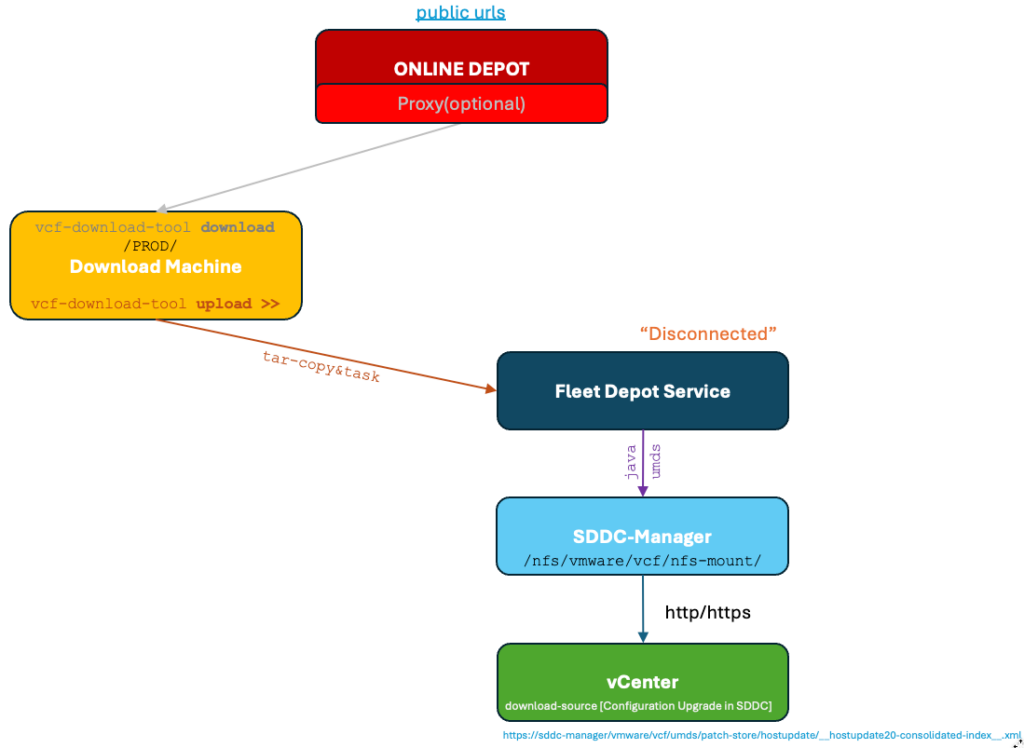
The more technical details are:
- The vcf-download-tool upload command is run on the Download Machine. This first creates a local tar-file in a (temporary working folder) that is later copied directly to the File-Service POD in the Depot-Service Deployment where it eventually gets extracted into the well-known /PROD folder-structure.
- The SDDC-Manager will recognize the contents and allow downloading of the binaries and/or Lifecycle/ESXi-component syncs
Binary Upload example from Download Machine to OPS/Fleet:
./vcf-download-tool depot binaries upload --ops-fqdn m01-vrops.vcf.lan --ops-auth-source LOCAL --ops-user admin --depot-fqdn vcfleet.vcf.lan --sku VCF --vcf-version 9.1.1.0  --depot-store /data/www/html/vcf911
*********Welcome to VCF Download Tool***********
---
Successfully exported depot from /data/www/html/vcf911 to /data/www/html/vcf911/workingDir/binaries_07b03a84-498e-45d6-a904-0c72b6ea4fa3.tar
Upload Progress: 2% (2.63 GB/131.60 GB) Speed: 33.30 MB/s ETR: 1h 06m 05s

ESXi & Metadata:
./vcf-download-tool depot esx upload --ops-fqdn m01-vrops.vcf.lan --ops-auth-source LOCAL --ops-user admin --depot-fqdn vcfleet.vcf.lan --depot-store /data/www/html/vcf911-test --ops-user-password-file opspwd.txt
*********Welcome to VCF Download Tool***********
---
Exported patch store is created at: /data/www/html/vcf911-test/exportstore_7440139646928704297/esxOfflineBundle.tar
Upload Progress: 100% (36.77 GB/36.77 GB) Speed: 62.03 MB/s ETR: 0s
Waiting for task 2d65ca6a-2933-433b-88df-ca5e57d028bc to complete (elapsed: 774 seconds)...

Task is running on Depot-Service. Check the log-details in the POD (with Radar for example):

2026-10-28T12:00:52.339+0000 INFO  [download_service,6ae1e19427ca8e09f4257f2f3078cf01,dc45] [c.v.e.s.l.t.d.i.u.BinaryImportServiceImpl,https-jsse-nio-0.0.0.0-8443-exec-6] Stream-based upload completed: esxOfflineBundle.tar (39481876480 bytes processed) in 608068 ms (608.07 seconds, 61.92 MB/s), uploadId: c7c3eb44-6597-4665-81dc-edcd6004cd0d

    2026-10-28T12:00:52.340+0000 DEBUG [download_service,6ae1e19427ca8e09f4257f2f3078cf01,dc45] [c.v.e.s.l.t.d.impl.TaskServiceImpl,https-jsse-nio-0.0.0.0-8443-exec-6] Created new task: {"id":"2d65ca6a-2933-433b-88df-ca5e57d028bc","type":"ESX_IMPORT","name":"Import ESX patch store","status":"PENDING","startTime":1793188244270,"endTime":0,"isCancellable":false,"isRetryable":false,"filePath":"/data/tmp/uploads/8c67f763-63ae-4206-ac42-005621be37f6/esxOfflineBundle.tar","force":false}

    2026-10-28T12:00:52.345+0000 DEBUG [download_service,6ae1e19427ca8e09f4257f2f3078cf01,dc45] [c.v.e.s.l.t.d.impl.TaskServiceImpl,https-jsse-nio-0.0.0.0-8443-exec-6] Processing the task with the id 2d65ca6a-2933-433b-88df-ca5e57d028bc and name Import ESX patch store

    2026-10-28T12:13:46.360+0000 INFO  [download_service,0000000000000000,0000] [c.v.e.s.l.t.d.impl.utils.TarUtil,pool-3-thread-1] Import Binaries has extracted tar /data/tmp/uploads/8c67f763-63ae-4206-ac42-005621be37f6/esxOfflineBundle.tar successfully and then deleted tar
    Depot esx upload task completed with status SUCCESSFUL
This concluded this blogpost! Hope you enjoyed it!!