
Native Key Provider – Troubleshooting
This blog is all about the Native Key Provider in vCenter and the way it can cause misunderstanding and troublesome situations. That is the moment we need to know more what is happening under the hood. In this post I will try to explain what I learned.
First, lets summarize what the NKP entails! This provider is included in vSphere since 2020 (7.0U2) and does not require an external key server (KMS). It enables vTPM for VM encryption and vSAN encryption and does not require a physical TPM2.0 installed on the ESXi-host. Backup of the NKP configuration is included in the file-based VCSA backup and manual NKP (p12) backup. The latter is required before the provider will be activated!
Next, we go a little deeper into the details on how the process works. This is important to use and understand the troubleshooting steps. Key processing is happening on both vCenter and ESXi:
- vCenter:
- Native Key Provider is configured with a name. vCenter (vpxd) generates a key-ID and KDK (Key Derivation Key). The KDK is encrypted and stored in the VCDB
- ESXi-host:
- The host (kmxa) receives the NKP configuration and stores it after combining keys in the ConfigStore.
- VM vmx-file:
- The VM’s vmx-file contains a reference to the used HostKey for encryption
The tools used to gather current and cached information are:
- vCenter UI:
- Native Key Provider overview and status
- VM Encryption status
- VM Policy Recrypt option
- vCenter shell
- PSQL VCDB Crypto related Host & NKP relation entries
- ESXi-shell:
- crypto-util HostKey/Cached-status
- ConfigStore hostKey/kms-provider information
Now, what happens when we start configuring NKP for use with Windows 11 and vTPM? The below scenarios, based on vSphere 8.0U3, explain what to expect and how to troubleshoot!
! Please note the key-id’s are shortened to make the output more readable !
Scenario 1: Single NKP with single ESXi-host for Win11-VM Encryption
Result after ADD and BACK-UP of new Key Provider in vCenter-UI:
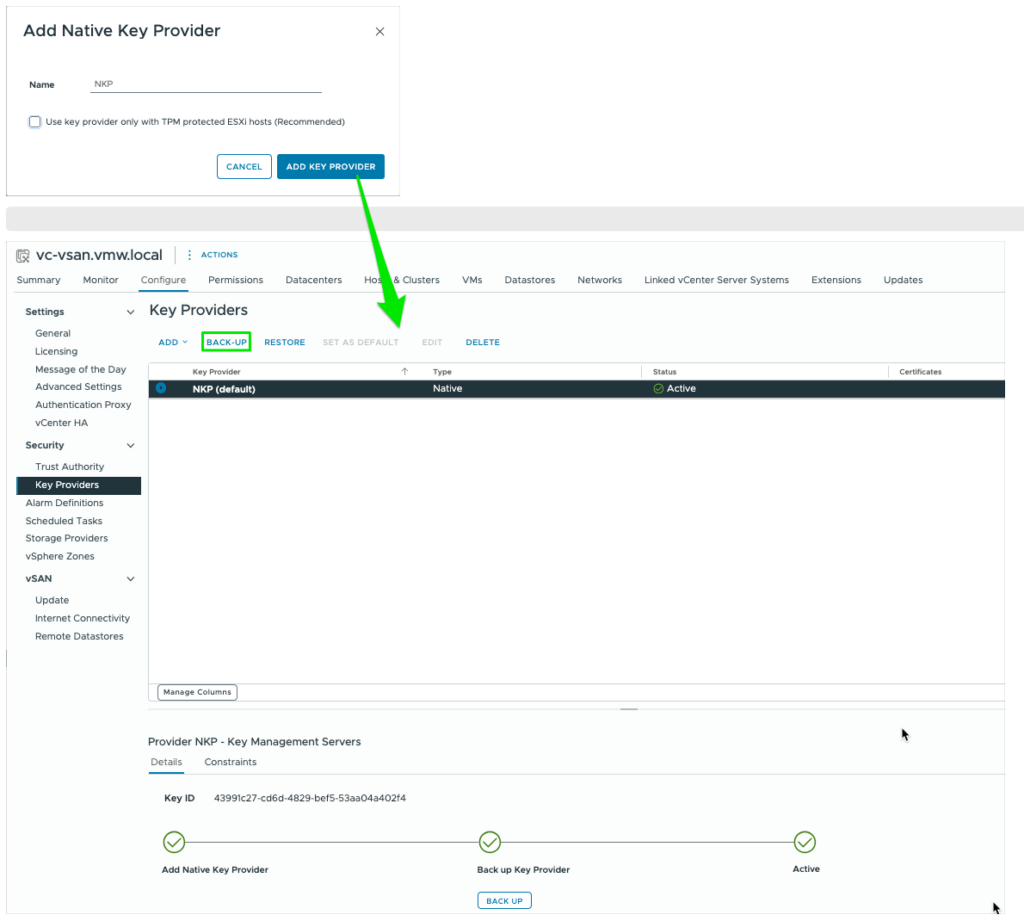
If, at this moment, we check the contents of the VCDB, HostKey-cache and ConfigStore, we will see no crypto configurations in place on both vCenter and ESXi-host
root@vc-vsan [ ~ ]# psql -U postgres -d VCDB -h localhost
VCDB=# select id, dns_name, crypto_state, crypto_key_id, crypto_key_provider_id, crypto_enable from vpx_host where dns_name like '192.168.1.__';
  id   |   dns_name   | crypto_state | crypto_key_id | crypto_key_provider_id | crypto_enable
-------+--------------+--------------+---------------+------------------------+---------------
 21533 | 192.168.1.51 |            0 |               |                        |
(1 row)
[root@esxi51:~] crypto-util keys getkidbyname "HostKey"
crypto-util keys: A key for 'HostKey' has not been established.The moment we create a new Win11-VM with vTPM enabled, we notice a change!
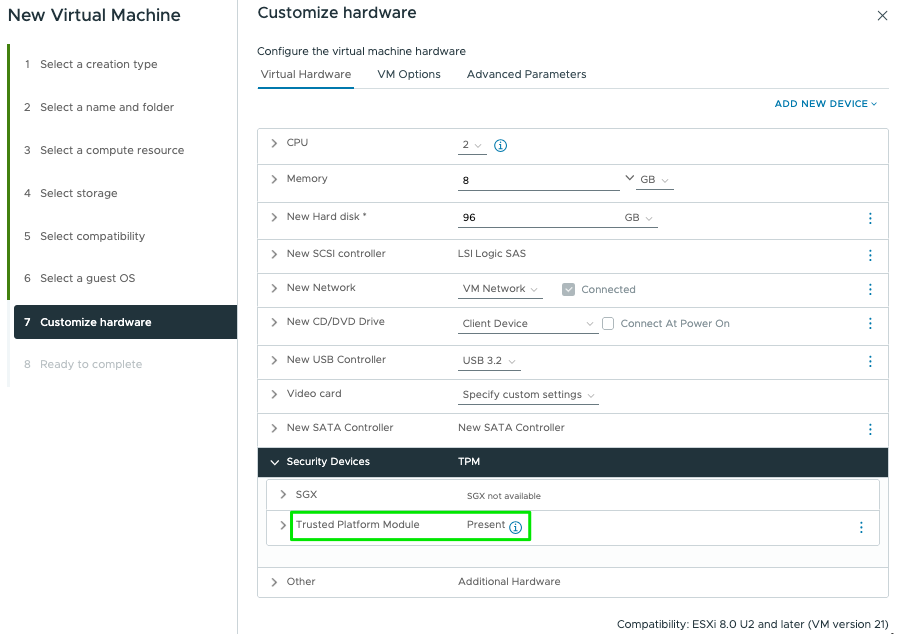
[root@esxi51:~] crypto-util keys getkidbyname "HostKey"
vmware:key/fqid/<VMWARE-NULL>/NKP/ASEAAgEA>>>EA
VCDB=# select id, dns_name, crypto_state, crypto_key_id, crypto_key_provider_id, crypto_enable from vpx_host where dns_name like '192.168.1.__';
id | dns_name | crypto_state | crypto_key_id | crypto_key_provider_id | crypto_enable
21533 | 192.168.1.51 | 2 | ASEAAgEA>>>EA | NKP | 1
(1 row)We see this host has received the crypto-key and it’s registered in VCDB with the configured key-provider. Because of this successful registration we can now also boot the VM with encryption enabled (recognize the NKP-name!).
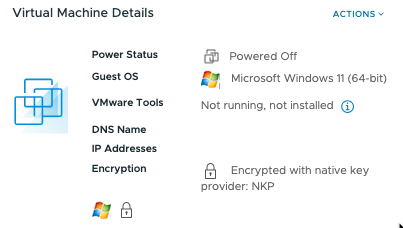
Also notice the reference of the used NKP in the vmx-file of the VM!
[root@esxi51:~] grep NKP /vmfs/volumes/Datastore/win11-52/win11-52.vmx
encryption.keySafe = "vmware:key/list/(pair/(fqid/<VMWARE-NULL>/NKP2/ASEAAgEA0IGhnkadTk2PFBIA0vOVhwEIAAwAEAAgAAQAQUVTLTI1NgCsYxVX8CA94VWnVGtVwTCOwNU2OW7m6%2fX%2fXyngh%2bVXv94zU0C8htBqgsUyBMHKwMghtHmYgZNv2%2fhpG02ghgEA,HMAC%2dSHA%2d256,m3KaSQkmPFAYRUKWz5kALANmJaUx8HJt8%2bCkiLILJMCluKay69pkdqg%2brfiYDsz3iC9IaH5wsWmaaDr%2fGHSwCHvzIY32FTPW98ooTbqzxJcMCtdYxuWt0FoahlB%2bv5Cw8164SHj%2bOa%2b5jyp7NZ3nBVOY1H2twlLl%2fJ8X%2bBfh2Mg%3d))"Scenario 2: File-based restore of VCSA
What happens when we need to restore the vCenter from a VAMI-file-based backup?
Well, both VCDB and the NKP backup are part of this and therefor we can expect the vCenter NKP to come back as it was before. Therefor the entry in VCDB remains as it was.
VCDB=# select id, dns_name, crypto_state, crypto_key_id, crypto_key_provider_id, crypto_enable from vpx_host where dns_name like '192.168.1.__';
  id   |   dns_name   | crypto_state | crypto_key_id | crypto_key_provider_id | crypto_enable
 21533 | 192.168.1.51 |            2 | ASEAAgEA>>>EA | NKP                    |             1
(1 row)On ESXi-host side nothing changes and the VM is still running as-is. The data stored in the ConfigStore and the cached keys are also still the same. Based on this the VM can also be restarted without consequences.
[root@esxi51:~] configstorecli config current get -c esx -g trusted_infrastructure -k "kms_providers"
[
   {
      "native_provider": {
         "key_derivation_key": "*******",
         "key_id": "2a278a96-0a72-46e2-994c-c40f944337c3"
      },
      "provider": "NKP",
      "type": "NATIVE"
   }
]
[root@esxi51:~] configstorecli config current get -c esx -g trusted_infrastructure -k "host_encryption_key"
{
"delete_on_boot": false,
"provider": "NKP",
"wrapped_key": "ASEAAgEA>>>EA"
}Or, with crypto-util:
[root@esxi51:~] crypto-util keys iskeyincache 'vmware:key/fqid/<VMWARE-NULL>/NKP/ASEAAgEA>>>EA'
YES
Scenario 3: Delete and restore NKP:
This scenario describes what happens to the registrations and VM’s once we delete and restore a NKP manually in vCenter-UI.
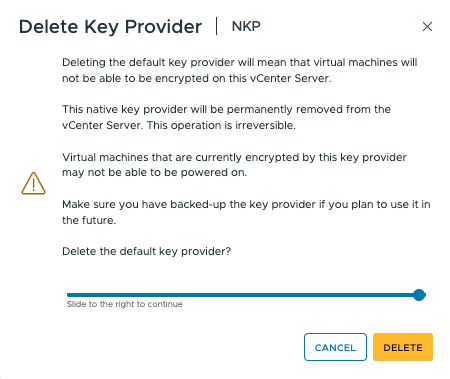
Directly after deleting the active and default NKP we see the VM keeps running without issue, but now it’s Encryption state converts to just “Encrypted”:
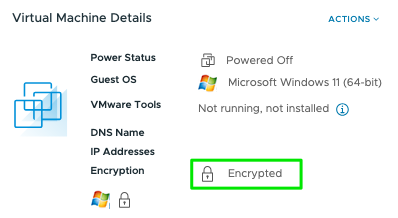
The VM keeps running and even rebooting the VM works as the ESXi-host still has the cached keys available!
[root@esxi51:~] crypto-util keys iskeyincache 'vmware:key/fqid/<VMWARE-NULL>/NKP/ASEAAgEA>>>EA'
YES
If we now reboot the ESXi-host, we notice the VM’s goes into ‘invalid state’ and Encrypted. At the same time we now receive a VM-locked Alarm. VCDB entry is still there, but now with state “0” and a host-alarm “Host Requires Encryption Mode Enabled”


VCDB=# select id, dns_name, crypto_state, crypto_key_id, crypto_key_provider_id, crypto_enable from vpx_host where dns_name like '192.168.1.__';
  id   |   dns_name   | crypto_state | crypto_key_id | crypto_key_provider_id | crypto_enable
 21533 | 192.168.1.51 |            0 | ASEAAgEA>>>EA | NKP                    |             1
(1 row)
Unlocking the VM or Enabling the Host Encryption mode is only possible after restoring the NKP! The VM comes back in “Encrypted with native key provider:NKP” state and VCDB crypto-state is “2” again.
Scenario 4: Introduce a secondary Native Key Provider
Like before we create a second Key Provider “NKP2” and back this up to active it. We also set this one as the default Key Provider.

In the VCDB we initially see no change. Same for the cached keys on the ESXi-host! Only change we notice is the registration of the second NKP2 in the ConfigStore:
[root@esxi51:~] configstorecli config current get -c esx -g trusted_infrastructure -k "kms_providers"
[
   {
      "native_provider": {
         "key_derivation_key": "*******",
         "key_id": "2a278a96-0a72-46e2-994c-c40f944337c3"
      },
      "provider": "NKP",
      "type": "NATIVE"
   },
   {
      "native_provider": {
         "key_derivation_key": "*******",
         "key_id": "bd8d5395-da3f-4f21-8d55-93572574bea0"
      },
      "provider": "NKP2",
      "type": "NATIVE"
   }
]
Creating a new WIn11-VM demonstrates this second default NKP2 is now in the lead for Encrypting new VM’s (the existing VM stays as is).
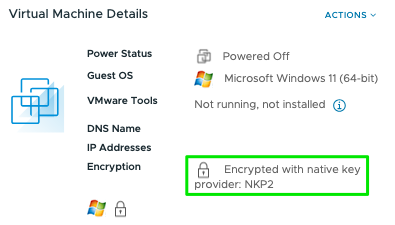
Final test is to reboot this ESXi-host and see what happens! Well, initially nothing as we saw in scenario 1, but once we create a new vTPM enabled VM on this host the usual process is started of distributing the default NKP2 as HostKey to the ESXi-host and the registration in the VCDB:
[root@esxi52:~] crypto-util keys getkidbyname "HostKey"
vmware:key/fqid/<VMWARE-NULL>/NKP2/ASEAAgEA>>>EA
VCDB=# select id, dns_name, crypto_state, crypto_key_id, crypto_key_provider_id, crypto_enable from vpx_host where dns_name like '192.168.1.__';
  id   |   dns_name   | crypto_state | crypto_key_id | crypto_key_provider_id | crypto_enable
 21533 | 192.168.1.51 |            2 | ASEAAgEA>>>EA | NKP                    |             1
 21542 | 192.168.1.52 |            2 | ASEAAgEA>>>EA | NKP2                   |             1
(2 rows)
Both keys are also in the keycache on the ESXi-host:
[root@esxi52:~] crypto-util keys iskeyincache 'vmware:key/fqid/<VMWARE-NULL>/NKP2/ASEAAgEA>>>EA'
YES

[root@esxi52:~] crypto-util keys iskeyincache 'vmware:key/fqid/<VMWARE-NULL>/NKP/ASEAAgEA>>>EA'
YES
Scenario 5: Clean-up host and register new NKP
In certain situations it might be necessary to get existing hosts registered with a new (added and default NKP). In this scenario we describe how to accomplish that.
With two NKP’s created where one of the two hosts still uses the old NPK we see the following information in VCDB:
VCDB=# select id,ip_address,datacenter_id,product_api_version,enabled,power_state,crypto_state,crypto_key_id,crypto_key_provider_id,crypto_enable from vpx_host;
  id  |  ip_address  | datacenter_id | product_api_version | enabled | power_state | crypto_state |                                                                crypto_key_id  crypto_key_provider_id | crypto_enable
   12 | 192.168.1.51 |             3 | 8.0.3.0             |       1 |           0 |            2 | ASEAAgEA>>>EA | NKP                    |             1
 1002 | 192.168.1.52 |             3 | 8.0.3.0             |       1 |           0 |            2 | ASEAAgEA>>>EA | NKP2                   |             1
(2 rows)
First, we need to delete the entry in VCDB:
Stop vpxd-services: # service-control --stop vpxd

VCDB=# update vpx_host set crypto_state=0, crypto_enable=0, crypto_key_id='', crypto_key_provider_id='' where id=12;
UPDATE 1
VCDB=# select id,ip_address,datacenter_id,product_api_version,enabled,power_state,crypto_state,crypto_key_id,crypto_key_provider_id,crypto_enable from vpx_host;
  id  |  ip_address  | datacenter_id | product_api_version | enabled | power_state | crypto_state |                                                                crypto_key_id  | crypto_key_provider_id | crypto_enable
   12 | 192.168.1.51 |             3 | 8.0.3.0             |       1 |           0 |            0 |                                                                                                                                              |                        |             0
 1002 | 192.168.1.52 |             3 | 8.0.3.0             |       1 |           0 |            2 | ASEAAgEA>>>EA | NKP2                   |             1
(2 rows)

Start vpxd-services: # service-control --start vpxd
Next, is to delete the local ConfigStore entry for the HostKey and reboot the host:
# configstorecli config current delete -c esx -g trusted_infrastructure -k "host_encryption_key"
Delete: completed successfully.
After reboot, we can check for the renewed NKP2 registration:
VCDB=# select id,ip_address,datacenter_id,product_api_version,enabled,power_state,crypto_state,crypto_key_id,crypto_key_provider_id,crypto_enable from vpx_host;
  id  |  ip_address  | datacenter_id | product_api_version | enabled | power_state | crypto_state |                                                                crypto_key_id                                                                 | crypto_key_provider_id | crypto_enable
 1002 | 192.168.1.52 |             3 | 8.0.3.0             |       1 |           0 |            2 | ASEAAgEA>>>EA | NKP2                   |             1
   12 | 192.168.1.51 |             3 | 8.0.3.0             |       1 |           0 |            2 | ASEAAgEA>>>EA | NKP2                   |             1
(2 rows)

[root@esxi51:~] configstorecli config current get -c esx -g trusted_infrastructure -k "host_encryption_key"
{
   "delete_on_boot": false,
   "provider": "NKP2",
   "wrapped_key": "ASEAAgEA>>>EA"
}
[root@esxi51:~] crypto-util keys getkidbyname "HostKey"
vmware:key/fqid/<VMWARE-NULL>/NKP2/ASEAAgEA>>>EA
Conclusions:
- ESXi-host get the default NKP as HostKey assigned by vCenter only once. Registration is done in de VCDB. See issues & solutions to change/fix this situation!
- All hosts receive all NKP keys in their keycache
- Main crypto registration is done during ESXi-host boot process. During lifetime ESXi HostKey stays active in the keycache
- Hostd requests data encryption keys (DEK) from kmxa, who itself gets the data from the ConfigStore, and uses them to encrypt virtual machine files.
- As long as an ESXi-host is running it will maintain it’s crypto status and it will have no effect on existing and new VM’s
- ESXi-Host will loose it’s keys during reboot if the NKP is not available anymore. VM’s are locked and original NKP restore needs to take place to unlock VM
- A VM will go in “Encrypted” state if it’s NKP was removed. At that moment the VM keeps running and we can Recrypt the VM with the at that moment available default NKP.
- A VM started with vTPM will remain active despite any changes on the underlaying NKP structure. Deleting existing NKP’s has no effect on the VM, even during new powerOn. Only after host reboot, thereby clearing the key-cache, VM status will become ‘Invalid’ and in Locked state. Unlocking possible only when corresponding NKP is restored
- When creating additional NKP’s (up to 32 max), make sure to use unique and recognizable names!
Related known issues & solutions:
- Native key provider is not active after upgrading the vCenter server
- The status of the Native Key Provider could not be changed to “Active” and remained in “Warning”
- Host requires encryption mode enabled. Manually recover the missing key
That’s it! Looking for more FAQ? Please check out this document!