VCF 9.1 Patches installation experience
This post describes the installation of various VCF 9.1 Patches. Starting point is a fresh VCF 9.1 Deployment. Patches for VCF components are released on regular base. The release notes can be found [here]. At the time of writing the blogpost newer patches were released, but the experience should be the same.
Download metadata, updates and patches in the offline depot
With VCF 9.1 you should use the new “Activation Code” which replaces the “download token” (which will also still work). More info in [KB443647]. Before starting the downloads, make sure you are on the latest release of the VCF Download Tool
To download Metadata only use the following command:
~/vcfdt/bin/vcf-download-tool metadata download --depot-download-activation-code-file=/home/ubuntu/atoken.txt --depot-store=/var/www/offline_depot/To download Patches for VCF 9.1 use the following command:
~/vcfdt/bin/vcf-download-tool binaries download --ceip=DISABLE --depot-download-activation-code-file /home/ubuntu/atoken.txt --depot-store=/var/www/offline_depot --patches-only --sku=VCF --type=UPGRADE --vcf-version=9.1Note the --patches-only and --type parameters. If you use --type=INSTALL, this will also download the patched (installer) binaries. Depending on the amount of available patches and your internet speed, this can take some time.
Sidenote: my offline depot webserver certificate was expired and I did not feel like generating a new one, since I wanted to get going! Luckily with VCF 9.1 you can connect an offline depot through http (without authentication). Maybe not the best choice, but I disabled SSL and authentication in the (Apache) webserver configuration. (See appendix for both configs).
Sidenote 2: As of VCF 9.1 the VCF Installer UI does not support this; you can only use the API with an unsecure offline depot, .
Upgrade Fleet LifeCycle to 9.1.0.0300
From VCF Operations, go to:
- Build, Lifecycle, VCF Management -> Upgrade
- Click Sync
Wait until the Fleet Lifecycle detects the new patch, then:
- Click Select Version
- Set Target Version -> Pick 9.1.0.0300
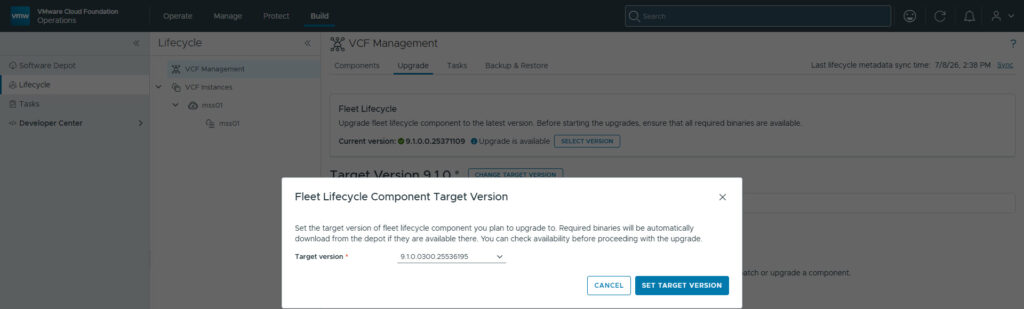
- Click Upgrade
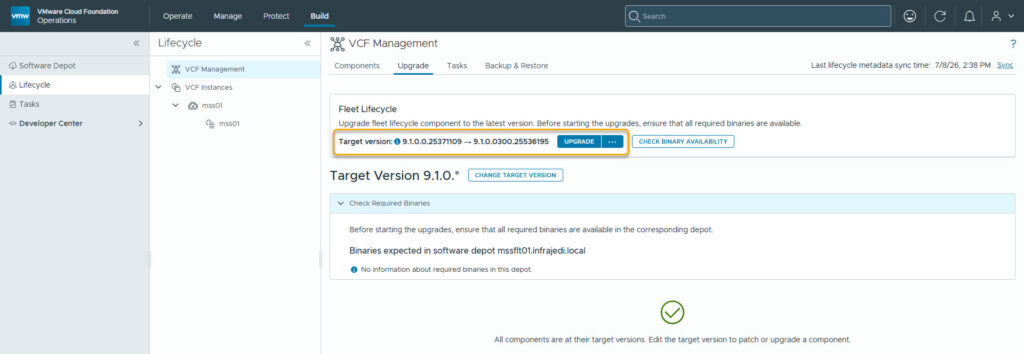
Wait until the upgrade has completed.
Set Target Version(s) and upgrade Management Components
From VCF Operations, go to:
- Build, Lifecycle, VCF Management -> Upgrade
- Change Target Version
- Select Customize
- Select Latest / desired Patch versions
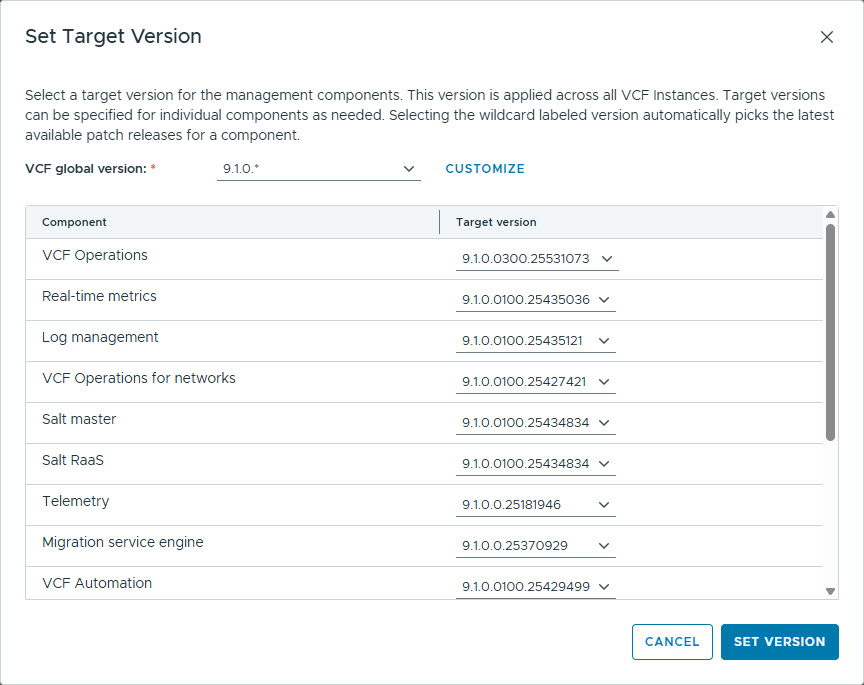
- Click Set Version
You should now see the available patches
- Run the Precheck on all components, and if all is good:
- Click Upgrade All, or Upgrade per component.
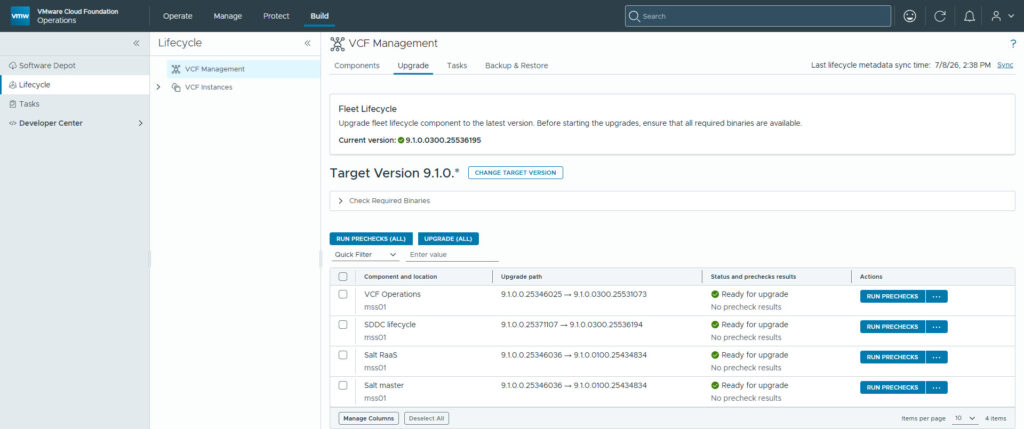
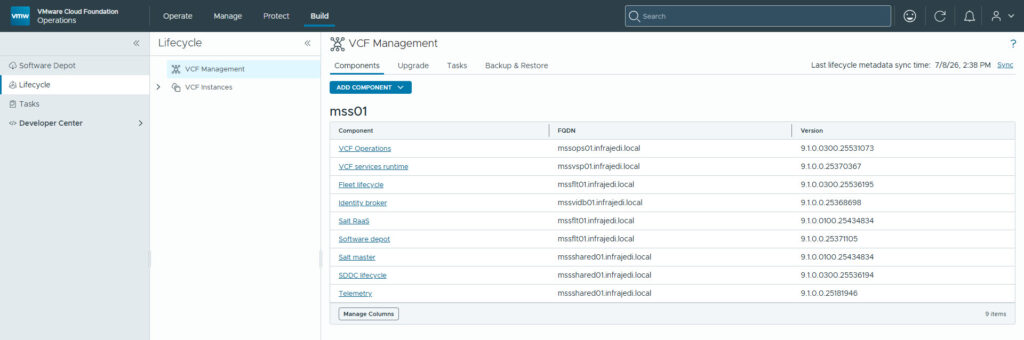
I did not run into any issues while upgrading any of the components. The result can be seen below:
Upgrade Instance
From VCF Operations, go to:
- Build, Lifecycle, VCF Instances, <Management Instance>
- Binary Management -> Patch Management
- Click Sync Now
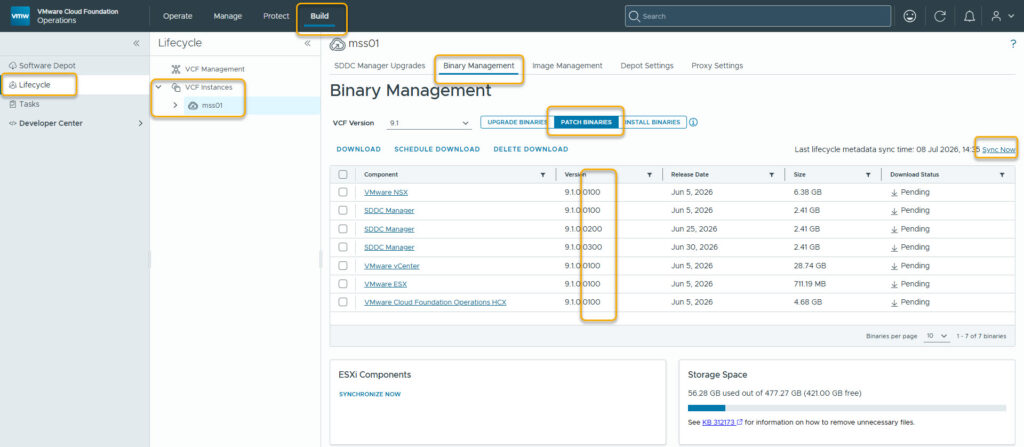
New Patch Binaries should show up (also check Install Binaries, in case you want to (re-)install a patched version; Patched Binary if you are familiar with vRSLM).
- Select latest releases and click Download
From VCF Operations go to:
- Build, Lifecycle, VCF Instances, <Management Instance>, <Management Domain>
- Upgrades, Plan Component Upgrade
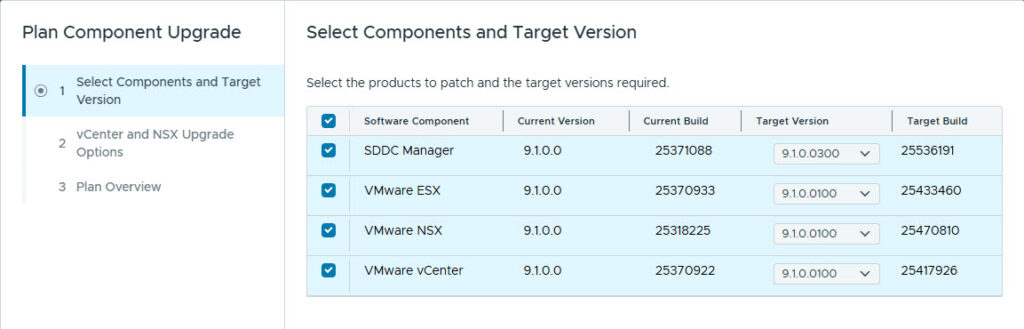
- Select the desired / latest versions
For the vCenter and NSX Upgrade Options you have 2 options:
- Optimized Maintenance Window Upgrade
- Sequential Upgrade
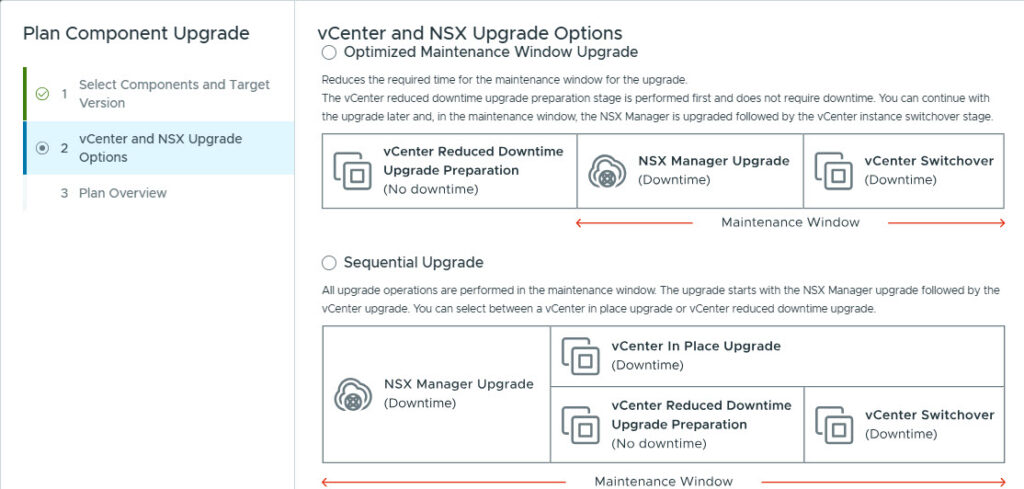
The Optimized Maintenance Window Upgrade workflow is as follows:
- VMware SDDC Manager 9.1.0.0300 Upgrade; You upgrade SDDC Manager first to ensure compatibility and orchestration of the remaining components during the upgrade process.
- Optimized Maintenance Window Upgrade
- VMware vCenter 9.1.0.0100 Preparation Stage; During the preparation stage a new VMware vCenter instance is deployed and all configurations from the existing instance are replicated. Until you upgrade your VMware NSX Manager nodes and you can switch over to the new VMware vCenter instance, the two instances are kept in sync.
- VMware NSX Manager Nodes 9.1.0.0100 Upgrade; Upgrade the VMware NSX Manager nodes independently from the NSX Edge nodes. This operation must be completed before the vCenter instance switchover stage. The upgrade coordinator is also upgraded.
- VMware vCenter 9.1.0.0100 Switchover Stage; After the VMware NSX Manager nodes upgrade completes you perform the switchover stage that completes the VMware vCenter instance upgrade.
- VMware ESX 9.1.0.0100 Upgrade; You upgrade your ESX hosts either sequentially or in parallel across multiple batches. The NSX kernel modules (VIBs) are also upgraded.
- VMware NSX Edge Clusters 9.1.0.0100 Upgrade and NSX Upgrade Finalize; If present upgrade the NSX Edge clusters in one or more sequential batches followed by the completion of the NSX Upgrade process.
The Sequential Upgrade workflow is as follows:
- VMware SDDC Manager 9.1.0.0300 Upgrade; You upgrade SDDC Manager first to ensure compatibility and orchestration of the remaining components during the upgrade process.
- VMware NSX Manager Nodes 9.1.0.0100 Upgrade; Upgrade the VMware NSX Manager nodes independently from the NSX Edge nodes. The upgrade coordinator is also upgraded.
- VMware vCenter 9.1.0.0100 Upgrade; Select between an in place and reduced downtime upgrade for the VMware vCenter appliance.
- VMware ESX 9.1.0.0100 Upgrade; You upgrade your ESX hosts either sequentially or in parallel across multiple batches. The NSX kernel modules (VIBs) are also upgraded.
- VMware NSX Edge Clusters 9.1.0.0100 Upgrade and NSX Upgrade Finalize; If present upgrade the NSX Edge clusters in one or more sequential batches followed by the completion of the NSX Upgrade process.
- I have chosen the Sequential Upgrade
After the page refreshes you can see all the Upgrade Sequence components
Upgrade SDDC Manager to 9.1.0.0300
Under VMware SDDC Manager
- Choose Upgrade now
Upgrade NSX to 9.1.0.0100
Next step is the VMware NSX Manager Nodes 9.1.0.0100 Upgrade
- Run Prececks
1 ran into 1 Precheck Errror: NSX-T Backup Configuration; “Validates NSX-T Manager backup configuration: remote file server configured, backups enabled, and target server separate from the SDDC Manager host. Storing NSX-T backups on the SDDC Manager appliance creates a single point of failure and resource contention. Always use a dedicated, separate backup target.”
After configuring NSX Backup I ran the Precheck again and the NSX Upgrade went smooth. NSX Backup can be configured through SDDC Manager (VCF Operations, Operate, Administration, SDDC Manager, or go directly to the SDDC Manager url)
Upgrade vCenter
Next up is the VMware vCenter 9.1.0.0100 Upgrade
Since I have chosen the Sequential Upgrade, I can choose between the upgrade type vCenter Reduced Downtime or vCenter Regular Upgrade.
I have chosen vCenter Regular Upgrade
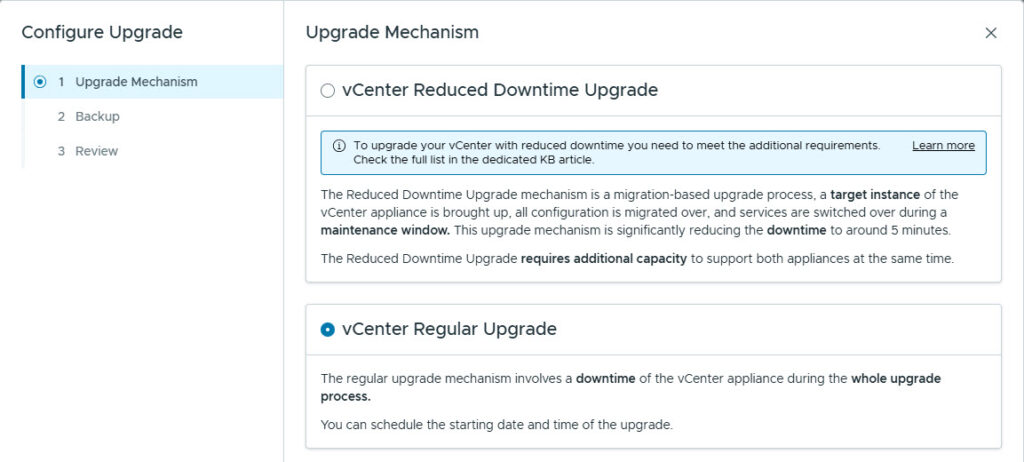
Make sure a backup is in place, before proceeding.
- Run Prechecks
- Upgrade Now
No issues with the vCenter upgrade.
Upgrade ESX to 9.1.0.0100
Next is the upgrade of ESX to 9.1.0.0100, which is a live patch
From vCenter go to:
- Lifecycle Manager, Software Depot
- Actions, Sync
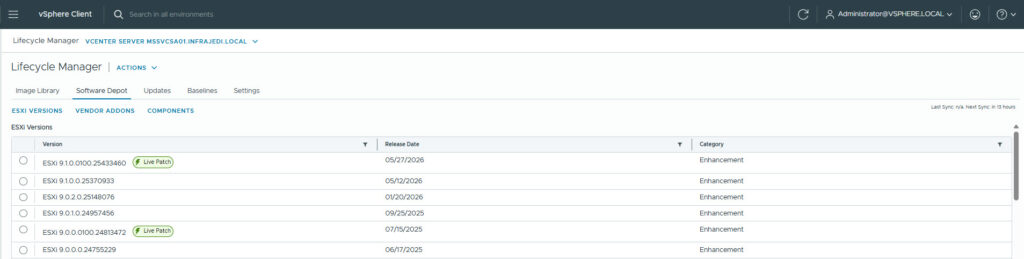
You should be able to see the (latest) releases in the Software Depot
- Lifecycle manager, Image Library
- Create Image
- Give the image a meaningful name and select the latest 9.1.0.0100 Version.
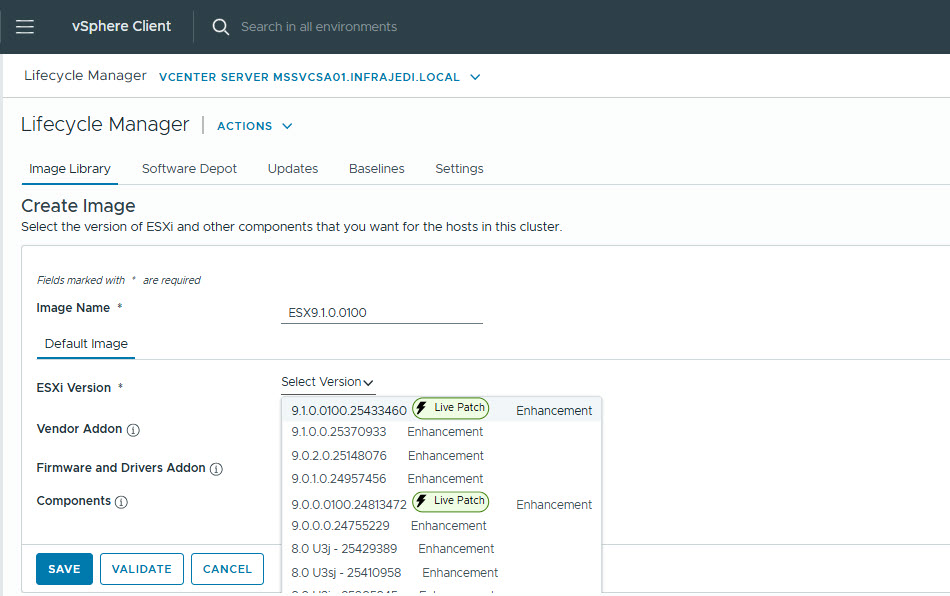
Note: If you check the Settings from Lifecycle Manager, you can see the Software Depot is configured and enabled as a source.
From VCF Operations, go to:
- Build, Lifecycle, VCF Instances, SDDC Manager
- Import Image
- Select Import from a vCenter
- Select the image created earlier
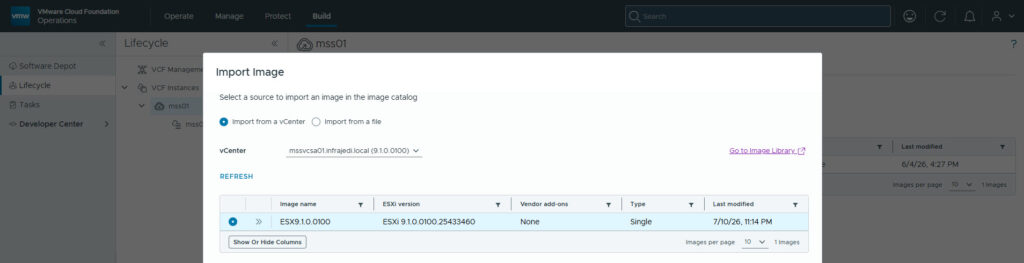
- Click Import
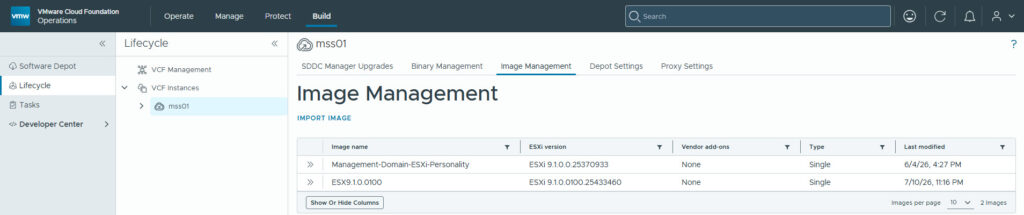
From VCF Operations, go to:
- Build, Lifecycle, VCF Instances, SDDC Manager
- Under ESX, Select Configure
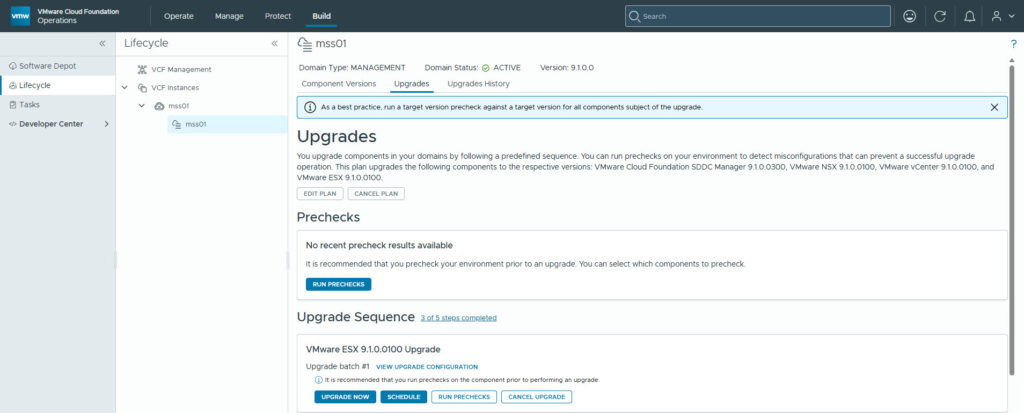
- Select All Clusters, or make a custom selection.
- Select the cluster(s) and assign the image
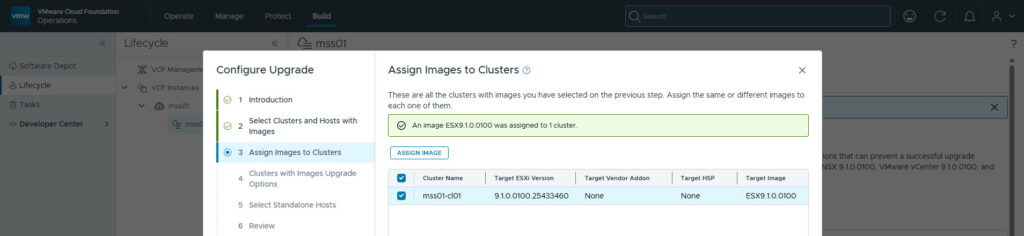
- Select the Clusters with Images Upgrade Options
- (de)Select Enable sequential cluster upgrade (Upgrades selected clusters sequentially so that one cluster must finish upgrading prior to upgrading the next cluster. Each cluster will upgrade one host at a time.)
- (de)Select Enable Quick Boot (Quick Boot feature reduces the reboot by skipping the full BIOS reboot.)
- Select VM power state options
- Do not change power state, Suspend to disk or memory, Power Off
- (de)Select to migrate powered off and suspended VMs
- Configure Retry Policy
- Enable Live Patch
- Auto; Use Live Patch when possible. Otherwise use Maintenance Mode/Reboot as needed.
- Enforce; Allow Live Patch remediation only. Stop if any host requires Maintenance Mode/Reboot.
- Run the Prechecks
- If prechecks are successful, click Upgrade now to start the upgrade
Since I’m running a nested lab, the prechecks returned a couple of errors:
- Host in vSAN maintenance mode possible; my vSAN datastore does not have much space left
- In vCenter vSAN Health, this shows as:
- Warning Storage space
- Warning What if the most consumed host fails
- Disk capacity
- In vCenter vSAN Health, this shows as:
- vSphere Lifecycle Manager image host hardware device validation; I’m running on unsupported hardware.
- PVSCSI SCSI Controller: Device is incompatible with the cluster’s target base image version (ESXi 9.1).
- In vCenter vSAN Health, this shows as:
- SCSI controller is VMware certified
- NVMe device is VMware certified
I fixed the vSAN storage and ignored the device validation errors.
When checking in vCenter, on the cluster and then Updates, I noticed the following messages:
- (warning) Live Patch scan script ’01_nsxhost_scan.py’ returned a warning: Getting a list of addrsets on global filter FAILED. Please check if nsxt-vsip is running, it is possible that no addrsets are configured.
- (warning) The host is not Live Patch eligible because it requires Maintenance Mode or Reboot to remediate.
- (warning) Live Patch cannot be performed together with the removal of VIB(s) VMware_bootbank_nested-esxi-customization_9.1.0-1.0.0. A reboot will be required.
- (warning) Modify the image to only perform the removal of the VIB(s). Then, modify the image again to perform the Live Patch remediation.
- (warning) The CPU on this host is not supported by ESXi. You can override and force remediate, but it is neither officially supported nor recommended. Please refer to KB 82794 for more details.
- (warning) The following VIBs on the host are missing from the image and will be removed from the host during remediation: nested-esxi-customization(9.1.0-1.0.0).
- (warning) To prevent them from being removed, include appropriate components that are equivalent to these VIBs. If this is seen while switching from using Baselines to using Images, please refer to KB 90188.
- (info) Live Patch scan script ’01_nsxhost_scan.py’ returned a message: Pending NSX upgrade from patch version 0 to patch version 0100
- (info) The host will be rebooted during remediation.
- (info) Quick Boot is supported on the host.
So unfortunately, no live patching as it seems the previous NSX upgrade is in the way.
The VMs on the host were migrated and the host itself put in maintenance mode. Then the upgrade took place, including a reboot of the hosts. No further issues were experienced.
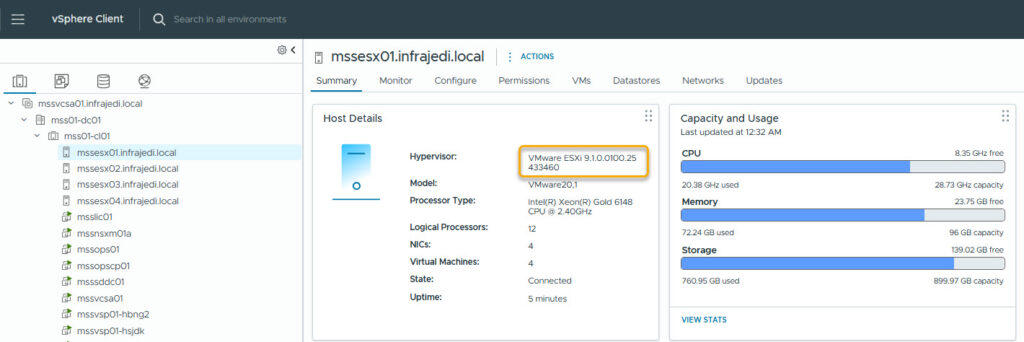
Upgrade NSX Edge Clusters to 9.1.0.0100 Finalize NSX upgrade
The last step is to upgrade NSX Edge Cluster, but I don’t have any running. Nevertheless, the workflow needs to be completed, so the NSX upgrade can be finalized..
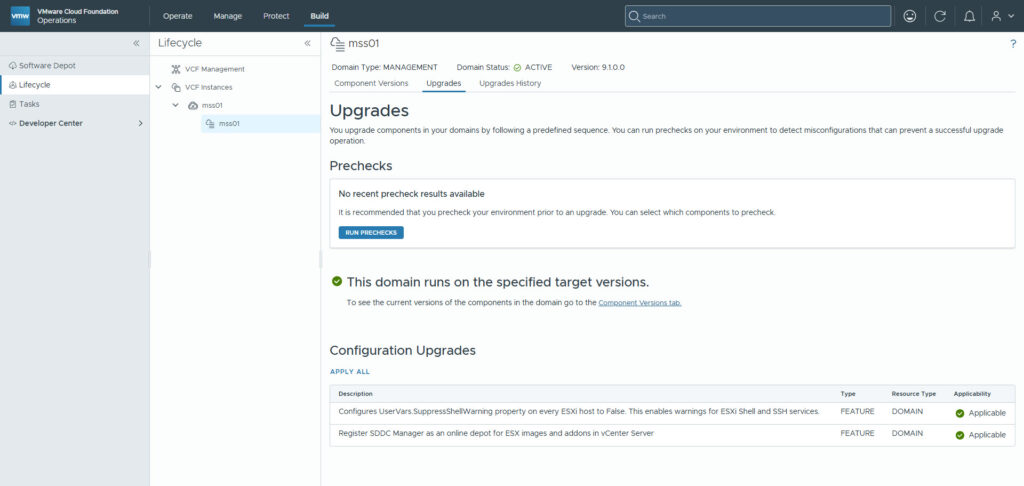
Appendix vcf-download-tool
Download Metadata only
./vcfdt/bin/vcf-download-tool metadata download --depot-download-activation-code-file=/home/ubuntu/atoken.txt --depot-store=/var/www/offline_depot/Download Patches only for 9.1
~/vcfdt/bin/vcf-download-tool binaries download --ceip=DISABLE --depot-download-activation-code-file /home/ubuntu/atoken.txt --depot-store=/var/www/offline_depot --patches-only --sku=VCF --type=UPGRADE --vcf-version=9.1-------------------------------------------------------------------------------------------------------------------------------------------------------------------------
ID | Component | Component Full Name | Version | Release Date | Size | Type
-------------------------------------------------------------------------------------------------------------------------------------------------------------------------
fd5b8ce1-c1ee-5260-9f03-f26263424173 | VCF_SDDC_LCM | SDDC lifecycle | 9.1.0.0100.25423352 | 06/05/2026 | 811.6 MiB | PATCH
4913e581-bcbb-53f0-b101-410575103ba6 | VCF_SDDC_LCM | SDDC lifecycle | 9.1.0.0200.25495903 | 06/25/2026 | 814.3 MiB | PATCH
ec7d9b85-33e7-58c6-9d72-de341ff11942 | VCF_SDDC_LCM | SDDC lifecycle | 9.1.0.0300.25536194 | 06/30/2026 | 814.8 MiB | PATCH
35073a34-6507-5838-92cb-ff2a492aec4d | VCF_FLEET_LCM | Fleet lifecycle | 9.1.0.0100.25423358 | 06/05/2026 | 752.0 MiB | PATCH
d0c41ddd-473c-54cb-829f-67f0b66761ee | VCF_FLEET_LCM | Fleet lifecycle | 9.1.0.0300.25536195 | 06/30/2026 | 755.2 MiB | PATCH
13d4a99d-7d70-5e04-986a-26e5fb4046c5 | VRA | VCF Automation | 9.1.0.0100.25429499 | 06/05/2026 | 14.9 GiB | PATCH
0be4788c-4820-5ae1-a6d4-e41d2aadccc2 | VCENTER | VMware vCenter | 9.1.0.0100.25417926 | 06/05/2026 | 28.7 GiB | PATCH
8f59bfff-2464-500b-9784-296463a4ad78 | HCX | VMware Cloud Foundation Operations HCX | 9.1.0.0100.25426672 | 06/05/2026 | 4.7 GiB | PATCH
5105d3b6-adc0-5a31-8317-a4b4b044425c | VRLI | Log management | 9.1.0.0100.25435121 | 06/05/2026 | 2.0 GiB | PATCH
cac2ee77-843e-4a11-8df5-f4b10c059113 | SDDC_MANAGER_VCF | SDDC Manager | 9.1.0.0100.25428926 | 06/05/2026 | 2.4 GiB | PATCH
2f787f9b-bfe4-4046-9c89-b3e8e470dc5c | SDDC_MANAGER_VCF | SDDC Manager | 9.1.0.0200.25496021 | 06/25/2026 | 2.4 GiB | PATCH
653b30f2-6334-4f99-b7fe-140510da77b8 | SDDC_MANAGER_VCF | SDDC Manager | 9.1.0.0300.25536191 | 06/30/2026 | 2.4 GiB | PATCH
501c27b5-d43b-5f46-a42e-cdd7ce193701 | ESX_HOST | VMware ESX | 9.1.0.0100.25433460 | 06/05/2026 | 711.2 MiB | PATCH
d3cc9f41-4bed-5973-9db4-1b238ac2917a | NSX_T_MANAGER | VMware NSX | 9.1.0.0100.25470810 | 06/05/2026 | 6.4 GiB | PATCH
fb48e512-cf0a-5ea7-8aad-f0bd0ee2bf4f | VCF_SALT_RAAS | Salt RaaS | 9.1.0.0100.25434834 | 06/05/2026 | 430.4 MiB | PATCH
c6ff39f3-eec7-5ddf-9a42-5dcbe0baa9e1 | VCFDT | VCF download tool | 9.1.0.0100.25429019 | 06/05/2026 | 467.6 MiB | PATCH
74a2bd33-ded5-5c8b-8b98-4c1256e2015e | VRNI | VCF Operations for networks | 9.1.0.0100.25427421 | 06/05/2026 | 5.8 GiB | PATCH
5384f2cd-81fe-5dbc-9ccd-7c0709928298 | VCF_SALT | Salt master | 9.1.0.0100.25434834 | 06/05/2026 | 333.1 MiB | PATCH
7bdab5c7-73c7-5a08-a017-c0b59f97cefb | VCF_OBSERVABILITY_DATA_PLATFORM | Real-time metrics | 9.1.0.0100.25435036 | 06/05/2026 | 1.7 GiB | PATCH
0297f3d7-5c88-50b8-85e8-3de9c2a18e20 | VROPS | VCF Operations | 9.1.0.0100.25435105 | 06/05/2026 | 6.2 GiB | PATCH
24301476-87de-54a2-bef2-90a51ada96e1 | VROPS | VCF Operations | 9.1.0.0200.25500350 | 06/25/2026 | 6.2 GiB | PATCH
95cfcf31-689d-579b-b232-a149e99b4420 | VROPS | VCF Operations | 9.1.0.0300.25531073 | 06/30/2026 | 6.2 GiB | PATCH
-------------------------------------------------------------------------------------------------------------------------------------------------------------------------
22 elements
-------------------------------------------------------------------------------------------------------------------------------------------------------------------------
Validating available free space.
Required disk space: 29050.4, available disk space : 7249414.0
Successfully validated available free space.
Starting binaries download.Download Patched Binaries for 9.1
~/vcfdt/bin/vcf-download-tool binaries download --ceip=DISABLE --depot-download-activation-code-file /home/ubuntu/atoken.txt --depot-store=/var/www/offline_depot --patches-only --sku=VCF --type=INSTALL --vcf-version=9.1*********Welcome to VCF Download Tool***********
Version: 9.1.0.0100.25429019
Validating depot credentials.
Depot credentials are valid.
Downloading unified release manifest file.
Successfully downloaded unified release manifest file.
Downloading product version catalog file.
Successfully downloaded product version catalog file.
Downloading vSAN HCL file.
vSAN HCL file is up to date, no download required.
Downloading compatibility data.
Successfully downloaded compatibility data.
Downloading unified compatibility data.
Successfully downloaded unified compatibility data.
Downloading vCenter upgrade info file.
Successfully downloaded vCenter upgrade info file.
Binaries to be downloaded:
---------------------------------------------------------------------------------------------------------------------------------------------------------------------------
ID | Component | Component Full Name | Version | Release Date | Size | Type
---------------------------------------------------------------------------------------------------------------------------------------------------------------------------
c7afe212-0aef-58a8-8cf5-dcdcc7818327 | VCF_OPS_CLOUD_PROXY | Cloud proxy | 9.1.0.0100.25434833 | 06/05/2026 | 2.7 GiB | INSTALL
4889df38-2d15-5f73-b135-633170bcfe5b | VCF_OPS_CLOUD_PROXY | Cloud proxy | 9.1.0.0200.25500351 | 06/25/2026 | 2.8 GiB | INSTALL
58b956c0-409a-5dd4-893f-8fb26316eee2 | VCF_OPS_CLOUD_PROXY | Cloud proxy | 9.1.0.0300.25531074 | 06/30/2026 | 2.8 GiB | INSTALL
0a02f34d-2e9d-500d-bbb6-b417e9e96870 | VCENTER | VMware vCenter | 9.1.0.0100.25417926 | 06/05/2026 | 12.0 GiB | INSTALL
de3a3d15-6b06-5171-9e07-683baa634155 | SDDC_MANAGER_VCF | SDDC Manager | 9.1.0.0100.25428926 | 06/05/2026 | 2.3 GiB | INSTALL
15826726-e15a-5f2e-bb19-5150eed717c6 | SDDC_MANAGER_VCF | SDDC Manager | 9.1.0.0200.25496021 | 06/25/2026 | 2.3 GiB | INSTALL
bc639e54-a80a-5630-b29c-f15c2b4bf742 | SDDC_MANAGER_VCF | SDDC Manager | 9.1.0.0300.25536191 | 06/30/2026 | 2.3 GiB | INSTALL
19c57bf5-4492-59b8-83eb-6d45c51acff3 | NSX_T_MANAGER | VMware NSX | 9.1.0.0100.25470810 | 06/05/2026 | 7.5 GiB | INSTALL
eb2aa9bf-11df-5ce0-add9-69864dd4fa7d | VCF_LICENSE_SERVER | License server | 9.1.0.0100.25434835 | 06/05/2026 | 667.1 MiB | INSTALL
fa7c1322-7cd9-50fc-9428-21f96cdb5de2 | VCF_LICENSE_SERVER | License server | 9.1.0.0200.25499768 | 06/25/2026 | 667.1 MiB | INSTALL
3b96c003-25ef-5550-860f-2b064d71f07e | VCF_LICENSE_SERVER | License server | 9.1.0.0300.25531069 | 06/30/2026 | 667.1 MiB | INSTALL
e48612e2-12f1-50b7-bff2-ec60a0d06861 | VROPS | VCF Operations | 9.1.0.0100.25435105 | 06/05/2026 | 3.1 GiB | INSTALL
93a9d2ab-9234-55af-9f5a-feb01f8f2b9d | VROPS | VCF Operations | 9.1.0.0200.25500350 | 06/25/2026 | 3.1 GiB | INSTALL
7eba9df2-c194-5d08-9486-23d2e997a1da | VROPS | VCF Operations | 9.1.0.0300.25531073 | 06/30/2026 | 3.1 GiB | INSTALL
c47da8e6-b8f1-5ae8-9359-2af08bd9eb68 | VRNI | VCF Operations for networks | 9.1.0.0100.25427421 | 06/05/2026 | 10.2 GiB | INSTALL
2a141812-4173-5fe1-be1e-35a1059a6485 | VCF_SDDC_LCM | SDDC lifecycle | 9.1.0.0100.25423352 | 06/05/2026 | 811.6 MiB | INSTALL
3650083b-5962-51e5-a238-41884f1c4a74 | VCF_SDDC_LCM | SDDC lifecycle | 9.1.0.0200.25495903 | 06/25/2026 | 814.3 MiB | INSTALL
6f6acb4f-7484-5023-a7eb-65a5e0cde74c | VCF_SDDC_LCM | SDDC lifecycle | 9.1.0.0300.25536194 | 06/30/2026 | 814.8 MiB | INSTALL
3eec1fe9-357b-5739-b113-ceee0bfb59d5 | VCFDT | VCF download tool | 9.1.0.0100.25429019 | 06/05/2026 | 467.6 MiB | INSTALL
342a5203-bc8e-51cb-9f64-b29509a14dc0 | VRLI | Log management | 9.1.0.0100.25435121 | 06/05/2026 | 2.0 GiB | INSTALL
d7b7f50b-f15e-55ce-8d80-54a5104183f2 | VCF_SALT | Salt master | 9.1.0.0100.25434834 | 06/05/2026 | 333.1 MiB | INSTALL
ee6974ad-a803-58a3-b0c2-b86bf61e622b | VCF_FLEET_LCM | Fleet lifecycle | 9.1.0.0100.25423358 | 06/05/2026 | 752.0 MiB | INSTALL
fe86adcc-733a-544e-a632-a68f4e2c922d | VCF_FLEET_LCM | Fleet lifecycle | 9.1.0.0300.25536195 | 06/30/2026 | 755.2 MiB | INSTALL
d1a8d3cd-74de-59c1-a26d-d46cf170430c | VCF_SALT_RAAS | Salt RaaS | 9.1.0.0100.25434834 | 06/05/2026 | 430.4 MiB | INSTALL
8396a956-aeb1-5e97-981c-97966e3f513e | VCF_OBSERVABILITY_DATA_PLATFORM | Real-time metrics | 9.1.0.0100.25435036 | 06/05/2026 | 1.7 GiB | INSTALL
ad46043f-a8b3-50c0-b994-9783fbce2f4d | VRA | VCF Automation | 9.1.0.0100.25429499 | 06/05/2026 | 14.9 GiB | INSTALL
a7cc99d3-1148-5781-99c8-598c17bbaa11 | HCX | VMware Cloud Foundation Operations HCX | 9.1.0.0100.25426672 | 06/05/2026 | 4.9 GiB | INSTALL
---------------------------------------------------------------------------------------------------------------------------------------------------------------------------
27 elements
---------------------------------------------------------------------------------------------------------------------------------------------------------------------------
Validating available free space.
Required disk space: 1024.0, available disk space : 7231700.0
Successfully validated available free space.
Starting binaries download.Appendix: Apache Configuration https with basic authentication
IfModule mod_ssl.c>
VirtualHost *:443>
  ServerAdmin webmaster@example.com
  ServerName depot9.infrajedi.local
  DocumentRoot /var/www/offline_depot
  SLEngine on
  SLCertificateFile /etc/ssl/certs/depot9.crt
  SLCertificateKeyFile /etc/ssl/private/depot9.key
  ErrorLog ${APACHE_LOG_DIR}/error.log
  CustomLog ${APACHE_LOG_DIR}/access.log combined
<Directory "/var/www/offline_depot">
  AuthType Basic
  AuthName "Restricted Content"
  AuthUserFile /etc/apache2/.htpasswd
  Require valid-user
</Directory>
<Directory /var/www/offline_depot/umds-patch-store>
  Require all granted
</Directory>
Alias /products/v1/bundles/lastupdatedtime /var/www/offline_depot/PROD2/vsan/hcl/lastupdatedtime.json
Alias /products/v1/bundles/all /var/www/offline_depot/PROD2/vsan/hcl/all.json
Alias /Compatibility/VxrailCompatibilityData.json /var/www/offline_depot/PROD2/evo/vmw/Compatibility/VxrailCompatibilityData.json
</VirtualHost>
/IfModule>
Appendix: Apache Configuration http without authentication (9.1+)
<VirtualHost *:80>
  ServerAdmin webmaster@example.com
  ServerName depot9.infrajedi.local
  DocumentRoot /var/www/offline_depot
  ErrorLog ${APACHE_LOG_DIR}/error.log
  CustomLog ${APACHE_LOG_DIR}/access.log combined
<Directory "/var/www/offline_depot">
  Require all granted
</Directory>
<Directory /var/www/offline_depot/umds-patch-store>
  Require all granted
</Directory>
Alias /products/v1/bundles/lastupdatedtime /var/www/offline_depot/PROD2/vsan/hcl/lastupdatedtime.json
Alias /products/v1/bundles/all /var/www/offline_depot/PROD2/vsan/hcl/all.json
Alias /Compatibility/VxrailCompatibilityData.json /var/www/offline_depot/PROD2/evo/vmw/Compatibility/VxrailCompatibilityData.json
</VirtualHost>